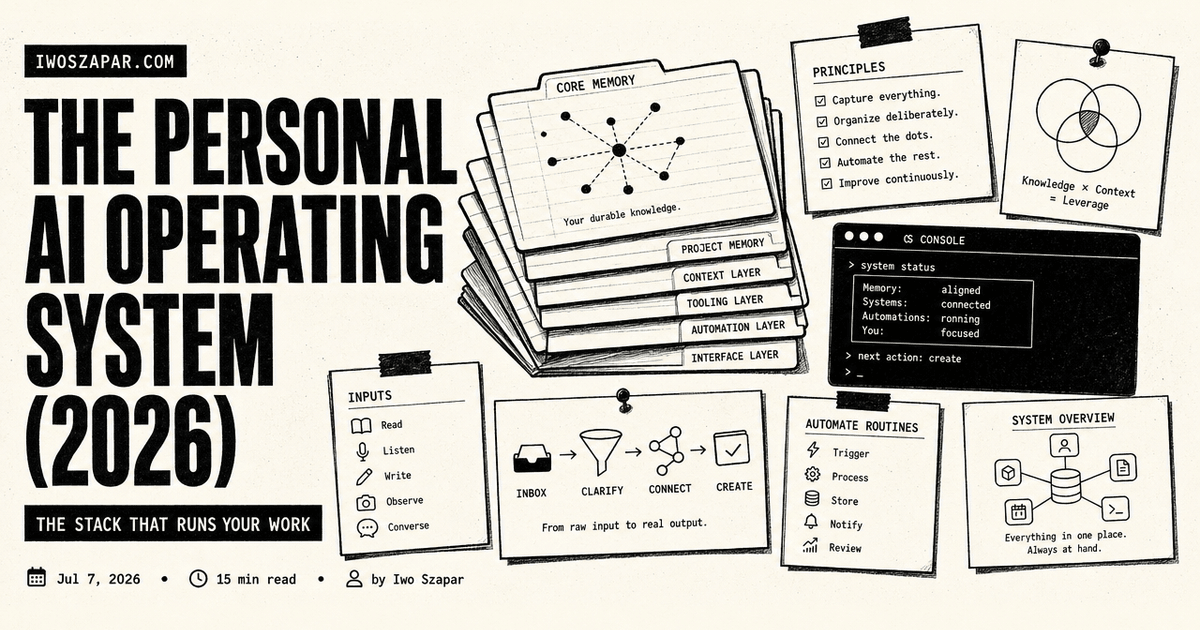
The personal AI operating system (2026)
The stack that runs your work
I used to think I had an AI setup. I had a chat window open all day, a few saved prompts, and a habit of pasting context in whenever the model needed it. It felt modern. It was not a system. It was a smart typewriter I fed by hand, and every morning it woke up knowing nothing about me or the work I was in the middle of.
The thing that actually changed how I work in 2026 is not a better model. It is a personal AI operating system: the full stack that runs your work rather than just answering questions. An assistant sits on top, a memory layer holds what you and it have learned, skills and agents do repeatable jobs, and a file system underneath keeps the source of truth. When those four layers connect, the AI stops being a tool you operate and starts being a layer that operates with you. This guide is how I think about that stack, how the pieces fit, and how to stand up your own version without buying into hype.
What is a personal AI operating system?
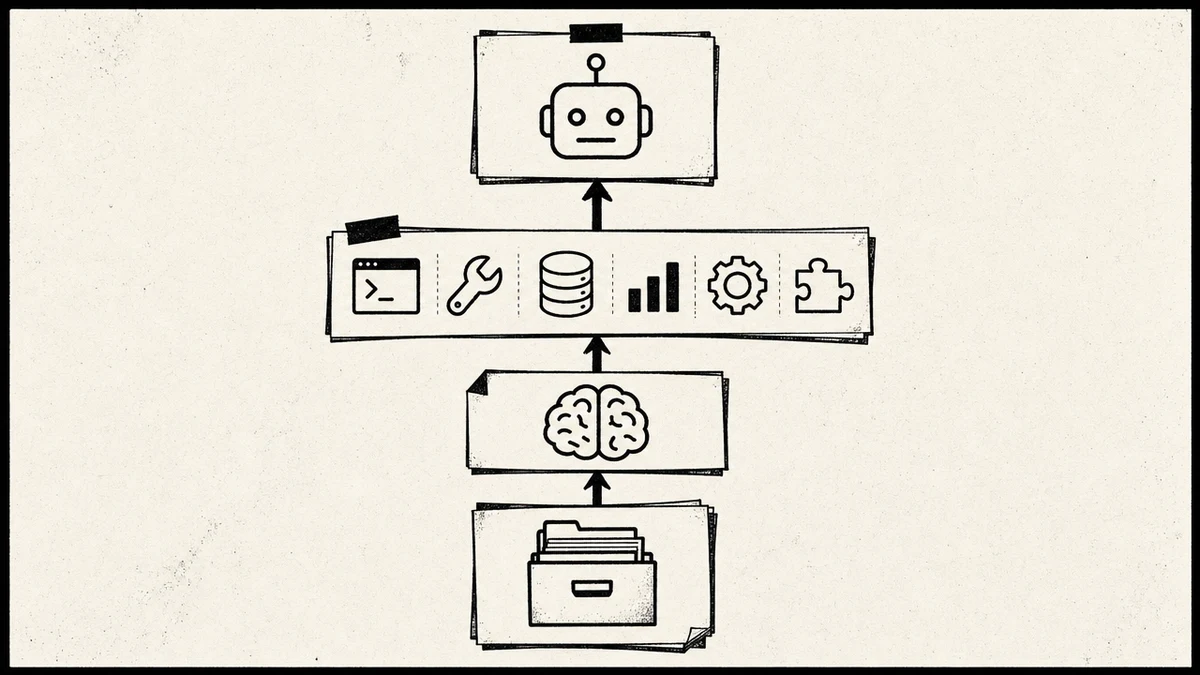
A personal AI operating system is the connected stack that runs your day-to-day work with AI: an assistant you talk to, a memory layer that remembers, a set of skills and agents that execute repeatable tasks, and a file system that holds the durable source of truth. The word operating is the whole point. A chat window answers a question and forgets it. An operating system runs your work across sessions, tools, and time.
The analogy to a real operating system is close enough to be useful. Your laptop OS is not any single app. It is the layer that manages memory, runs programs, and reads and writes files, so the apps on top can do their jobs without reinventing that plumbing. A personal AI OS does the same for your knowledge work: it manages what the AI remembers, runs the agents and skills you rely on, and reads and writes the files that hold your real work.
This is broader than a second brain, and the distinction matters. A second brain remembers. A personal AI operating system runs your day, and it contains a second brain as its memory layer. If you only ever want recall, you want a second brain. If you want the AI to actually do the work with that recall loaded, you want the stack around it. I cover the remembering half in depth in the AI second brain guide, with the hands-on rebuild of the practice in building a second brain the AI way, and this piece is the layer above them.
Why an assistant alone is not an operating system
The common mistake, and the one I made for a year, is treating the assistant as the whole thing. You pick a good model, learn to prompt it well, and assume that is your AI setup. It is not, for one structural reason: the assistant has no state you control.
An assistant alone forgets. Every session starts cold, so you pay a re-explaining tax on the same context, your role, your projects, your voice, your standing decisions, over and over. It also cannot do anything durable. It can draft an email in the chat, but it does not file the decision, update your notes, or leave a trace the next session can pick up. And it lives in one window, so what you told it in one tool is invisible to the same model in another tool an hour later.
The best AI assistants in 2026 are trying to close that gap, and it is worth seeing where they land. I compared the category in the best AI personal assistant roundup, and the pattern is consistent: the assistants that feel like a step change are the ones wired to memory and execution, not the ones with a slightly better base model. The assistant is the interface to the operating system. It is not the operating system.
If wiring up that memory yourself sounds like work you would rather skip, that is the honest gap Iwo's Second Brain is built to fill: it does the filing and recall for you on Iwo's MemoryOS, so the assistant stops waking up cold. The zero-risk way to start is the free Health Check, which scores your current setup with no commitment before you change anything.
The four layers of the stack
Here is the stack I run, from the bottom up. Each layer does one job, and the value comes from them being connected, not from any one being clever.
| Layer | What it does | What it looks like in practice |
|---|---|---|
| File system | Holds the durable source of truth | Your repos, docs, and notes on disk or in a store you own |
| Memory layer | Remembers facts, decisions, and context across sessions | An MCP memory server the AI reads and writes |
| Skills and agents | Execute repeatable, defined jobs | Reusable workflows and background agents you invoke by name |
| Assistant | The interface you talk to | Claude, or another client, sitting on top of all three |
Read top to bottom and it is a chain of command. Read bottom to top and it is a chain of trust: the files are the ground truth, the memory layer distills what matters from them, the skills act on that memory, and the assistant is where you sit. A weak layer anywhere breaks the chain. A great assistant on top of no memory is the smart typewriter I started with. A great memory layer with no skills is a well-organized library nobody ever acts on.
The layer people underinvest in is memory, so most of this guide gives it the room it deserves. But first, a real task, so the abstraction has something to stand on.
How the layers work together on a real task
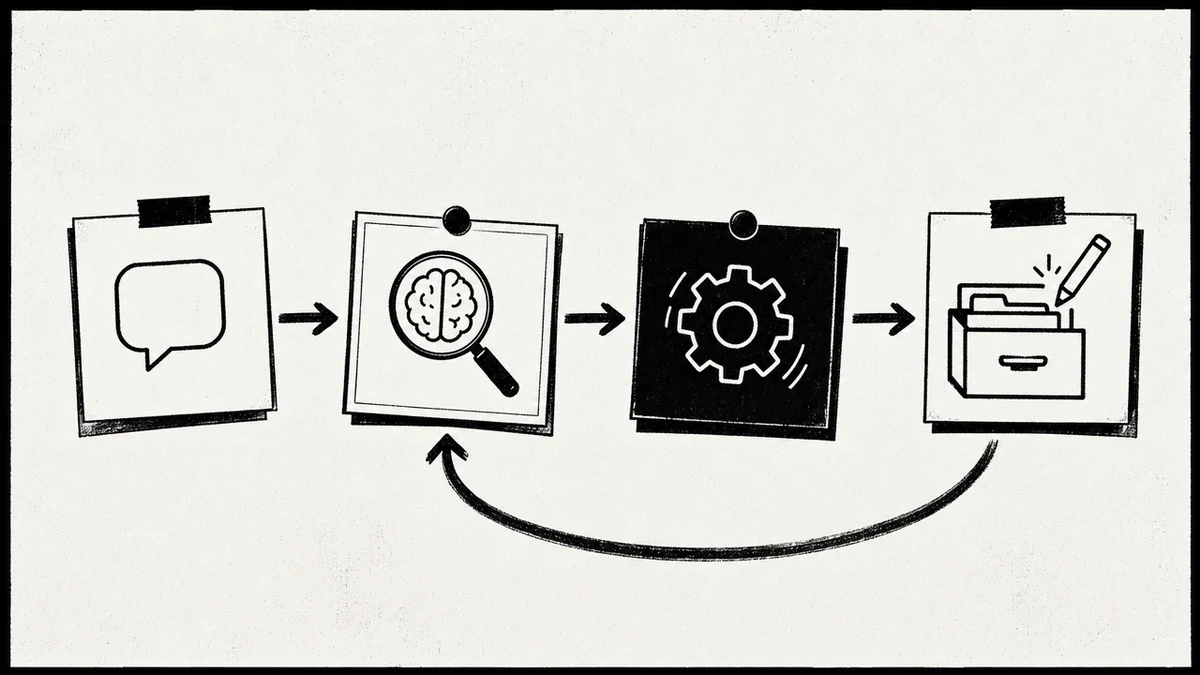
Take one ordinary job: I need to draft a follow-up to a client after a call. Watch what each layer contributes.
- I ask the assistant to draft the follow-up. That is the only manual step. I do not paste anything.
- The memory layer gets queried first. Before writing a word, the assistant pulls that client's facts, the last decision we made together, and any open loop still hanging. This is recall, and it is the difference between a generic email and one that sounds like it came from someone who was actually in the room.
- A skill does the shaped work. I have a follow-up skill that knows my format: short, specific, one clear next step. The assistant runs it instead of improvising the structure every time.
- The result gets written back. The new commitment I just made in that email becomes an open loop in memory. Next week, when I ask what is outstanding with this client, it is there.
- The file system stays the ground truth. If the details live in a doc or a repo, the assistant reads from there rather than trusting a half-remembered summary.
No single layer did anything magical. The follow-up was good because recall loaded the context, a skill shaped the output, and the write-back means next week starts ahead of this week instead of level with it. That loop, recall then act then write back, is what running your work with an operating system feels like. For the assistant-side habits that make this reliable, I keep a short standing setup, and I wrote the ones that matter most in my Claude Code best practices.
The memory layer is the part people skip
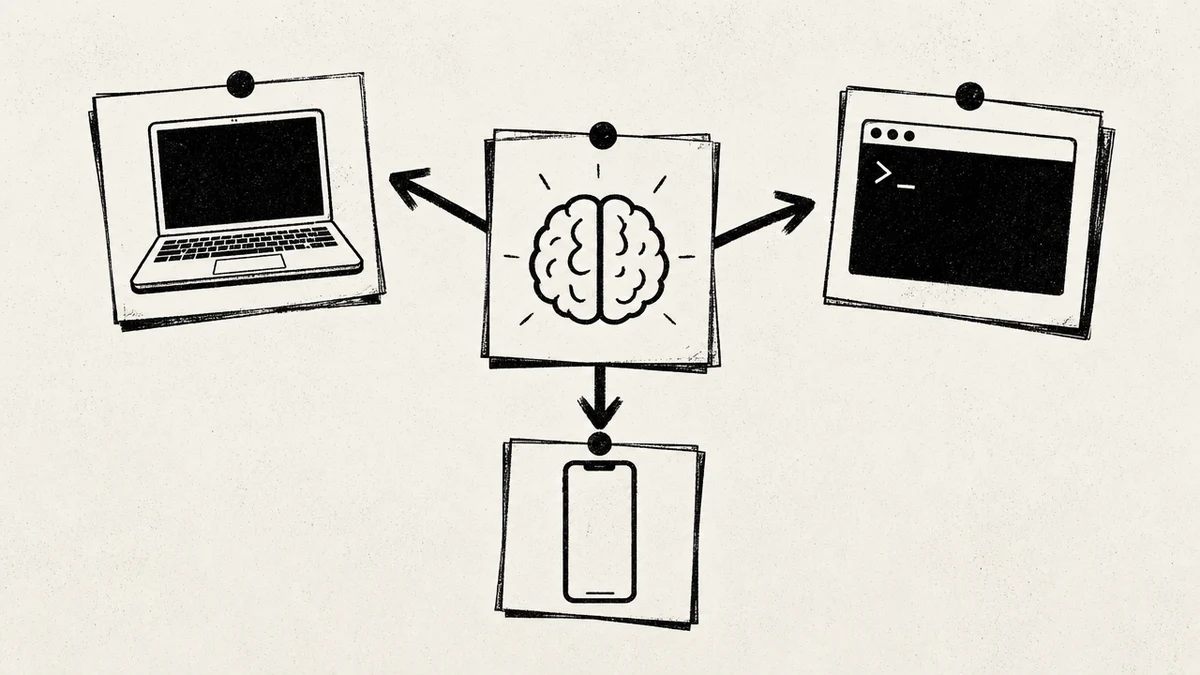
If you take one thing from this guide, take this: the memory layer is the load-bearing wall of a personal AI operating system, and it is the layer almost everyone skips. An assistant is easy to adopt because you already have one. Skills feel optional until you have a few. But memory is the thing that turns four disconnected tools into a system, and it is invisible until it is missing.
Built-in chat memory is not enough for this, and it is worth being precise about why. The memory toggles inside a chat app capture loosely, you cannot see or organize what they kept, they do not file by type, and they do not follow you from one tool to another. They are a convenience feature, not an architecture. For an operating system you need a memory layer you can inspect, structure, and reach from any client.
In 2026 the standard way to give the stack that layer is an MCP memory server. MCP, the Model Context Protocol, is the connection that lets an AI client reach an external tool, and a memory server is a tool whose one job is holding and returning your knowledge. The assistant gets memory functions, write this fact, find what we know about this client, list open decisions, and calls them like any other capability. I broke the setup down step by step in the MemoryOS MCP guide, and the mechanics of an agent driving that store are in how to build a second brain with an AI agent.
The memory layer I run is Iwo's MemoryOS, an MCP memory server, with Iwo's Second Brain as the structured store on top of it. It works with Claude Code, Claude Cowork, Claude Desktop, Cursor, and Windsurf, so one memory follows me across whatever client I open. The data sits in a local database on my machine rather than someone else's server, which matters the moment your memory holds client facts and private decisions. Iwo's MemoryOS Standard tier runs the ambient monitoring that keeps stored knowledge from going stale, at $199 a year, with a free Health Check if you just want to score what you already have before committing. Pricing is current as of mid-2026 and can change, so confirm on the product page before you buy.
What to structure inside the memory layer
A memory layer is only as good as the shape of what goes in it. Dump everything into one blob and you can store fast but never recall precisely, which is exactly the failure that kills note-app second brains. The fix is a small set of typed surfaces the AI files into, so a query can ask for one kind of thing.
The three I lean on hardest:
- Decisions. What you chose and why. This is the surface that stops you relitigating the same call three times.
- Facts. Stable truths about you, a project, or a client. The AI reads these so it stops asking what it should already know.
- Open loops. Unfinished threads and commitments, so nothing quietly falls through between sessions.
You do not need a sprawling taxonomy. A handful of types the assistant understands beats a deep folder tree nobody maintains. This is also where an established organizing method earns its keep. If you already think in projects and reference material, the PARA method maps cleanly onto memory surfaces, and running that structure inside an AI workspace is its own worked exercise in how to use PARA in an AI second brain. The method organizes, the memory layer remembers, and the assistant acts. They are different jobs, and a good stack keeps them distinct.
Skills and agents: the execution layer
Memory is what the operating system knows. Skills and agents are what it does. This layer is where the stack goes from a very well-informed chat to something that actually moves work forward while you are doing something else.
A skill is a repeatable, defined job you invoke by name instead of re-describing every time. My follow-up format, my weekly review, the way I turn a rough outline into a first draft, each of those is a skill, so I get the same shaped output without rebuilding the instructions. An agent is a skill that runs with more autonomy, often in the background: it watches for a trigger, does the work across several steps, and pings me only when it needs a decision. The shift the whole field made in 2026 was from assistants that wait for your next prompt to operators that run in the background and surface only what needs you.
The reason this layer depends on the ones below it is simple. A skill with no memory is generic, it produces the same output for everyone. A skill wired to your memory layer produces output shaped by your decisions, your facts, and your voice. Execution without memory is a template. Execution on top of memory is an operating system doing your work the way you would.
How to build your own personal AI operating system
You do not stand up the whole stack at once, and you should not try. Build it bottom-up, one working layer at a time, so each layer earns its place before you add the next.
- Start with the file system you already have. Your repos, docs, and notes are the ground truth. You do not need to move them. You need the AI to be able to read them.
- Add the memory layer next, not the skills. This is the counterintuitive order. Connect an MCP memory server and give the assistant read and write functions before you automate anything, because everything above works better once recall is reliable.
- Give the assistant a standing memory file. One short file it loads every session with who you are, what you are working on, your voice, and two rules: recall before acting, and capture decisions, facts, and open loops as you go.
- Run one real task and let it capture. Do actual work, watch the assistant file things, correct a miscategorization once, and it learns the pattern.
- Add skills only for jobs you repeat. Do not pre-build a library. When you catch yourself giving the same shaped instruction a third time, turn it into a skill.
- Turn on upkeep so the layer stays trustworthy. Let the memory layer flag stale facts and superseded decisions instead of auditing by hand, so the stack does not rot on your first busy week.
If wiring each layer by hand is not how you want to spend an afternoon, Iwo's Second Brain ships the memory layer, the typed surfaces, and the capture-and-recall protocol as a template on Iwo's MemoryOS, so you start with the load-bearing layer already standing and build the rest on top.
Where a personal AI operating system breaks
I would rather you go in knowing the failure modes than discover them the hard way, because I have hit each one.
- No memory layer. The most common failure. Without it you have a fast assistant with amnesia, and you stay the integration layer between your own notes and the work.
- One giant memory blob. Storing without typing means recall returns noise, you stop trusting it, and you drift back to pasting context by hand.
- Skipping straight to agents. Autonomy on top of weak memory just automates generic output faster. Get recall right before you add execution.
- A bloated memory file. Stuffing the whole brain into the always-loaded file makes every call slower and more expensive. The file points to the memory layer, it is not a copy of it.
- Never reviewing. Hands-off is the goal, but blind is not. Skim what the system files for the first week so you trust the surfaces before you lean on them.
None of these are exotic. They are all versions of the same mistake: treating one flashy layer as the whole system instead of building the connected stack.
FAQ
What is a personal AI operating system?
A personal AI operating system is the connected stack that runs your work with AI: an assistant you talk to, a memory layer that remembers across sessions, skills and agents that execute repeatable jobs, and a file system that holds the durable source of truth. Unlike a single chat window, it maintains state and does work rather than only answering questions. The memory layer is what turns the separate tools into a system.
How is a personal AI operating system different from a second brain?
A second brain remembers, and a personal AI operating system runs your day. The operating system is broader: it contains a second brain as its memory layer, then adds the skills, agents, and file system that act on what the memory holds. If you only want recall, a second brain is enough. If you want the AI to do the work with that recall loaded, you want the full stack around it.
Do I need to code to set one up?
No. The hardest step is connecting an MCP memory server to your AI client, and that is configuration, not programming. Writing the standing memory file is plain English, and skills are defined instructions rather than code. A packaged option like Iwo's Second Brain on MemoryOS handles the memory layer and the protocol, so you mostly write instructions.
What is the memory layer, and why is it the most important part?
The memory layer is the store the AI reads from and writes to across sessions, usually an MCP memory server. It is the most important part because it is what connects the other layers into a system: skills wired to it produce output shaped by your context, and the assistant stops starting cold every session. Without it you have a fast assistant with no state, which is a tool, not an operating system. The MemoryOS setup guide walks the connection end to end.
Which AI tools can I run a personal AI operating system on?
Any client that supports MCP and a persistent instruction file. I run mine across Claude Code, Claude Cowork, Claude Desktop, Cursor, and Windsurf, with one MemoryOS memory layer behind all of them, so the same context follows me regardless of which tool I open. The skills and typed surfaces work the same way in each client.
How does PARA fit into a personal AI operating system?
PARA is an organizing method, so it fits inside the memory layer as a way to structure what gets filed, not as a replacement for any layer. Its four buckets map onto memory surfaces cleanly, which keeps recall precise. For the method itself, see the PARA method guide, and for running that structure inside an AI workspace, see how to use PARA in an AI second brain.
Is a personal AI operating system just a bundle of separate tools?
No, and that is the whole distinction. A bundle of tools that do not share state is still a bundle. What makes it an operating system is that the layers connect: the assistant reads from the memory layer, skills act on it, and results write back to it, so the system compounds instead of resetting each session. The connection is the product, not any single tool in it.
Start with the layer that connects the rest
A personal AI operating system only pays off when the layers actually connect, and the layer that connects them is memory. If you want that layer standing without wiring it by hand, Iwo's Second Brain ships it as a template on MemoryOS, so capture, recall, and upkeep run on their own while you build the assistant and skills on top. The single next step is the free Health Check: it scores your current setup in a few minutes, costs nothing, and tells you exactly which layer to fix first before you commit to anything. For the remembering half on its own, start with the AI second brain guide.
Choose your next step
Choose the operating or execution layer to strengthen
template
AI Chief of Staff
The AI Chief of Staff template gives you a practical starting point for the layer that turns context into an operating rhythm.
Use a template for priorities, metrics, and meetings
template
AI Work Cycle
The AI Work Cycle skill gives you a clear operating loop for work that should improve after every run.
Use one skill for planning, execution, review, and learning