Set up persistent memory in Claude with MemoryOS MCP (2026)
Persistent memory across every Claude session
How to set up persistent memory in Claude with MemoryOS MCP
Every Claude conversation starts from zero. You explain your project, your decisions, and your context, and the next session you do it all again. The model is brilliant and amnesiac at the same time.
Iwo's MemoryOS MCP fixes that. It gives Claude a memory layer that lives in a folder on your disk, exposes it through the Model Context Protocol, and lets the model read and write structured memory across every session. You decide once. Claude remembers from then on.
I built MemoryOS because I was tired of re-briefing my own assistant. This guide is the full setup, from install to your first recall, in about 15 minutes.
What you need to set up persistent memory in Claude
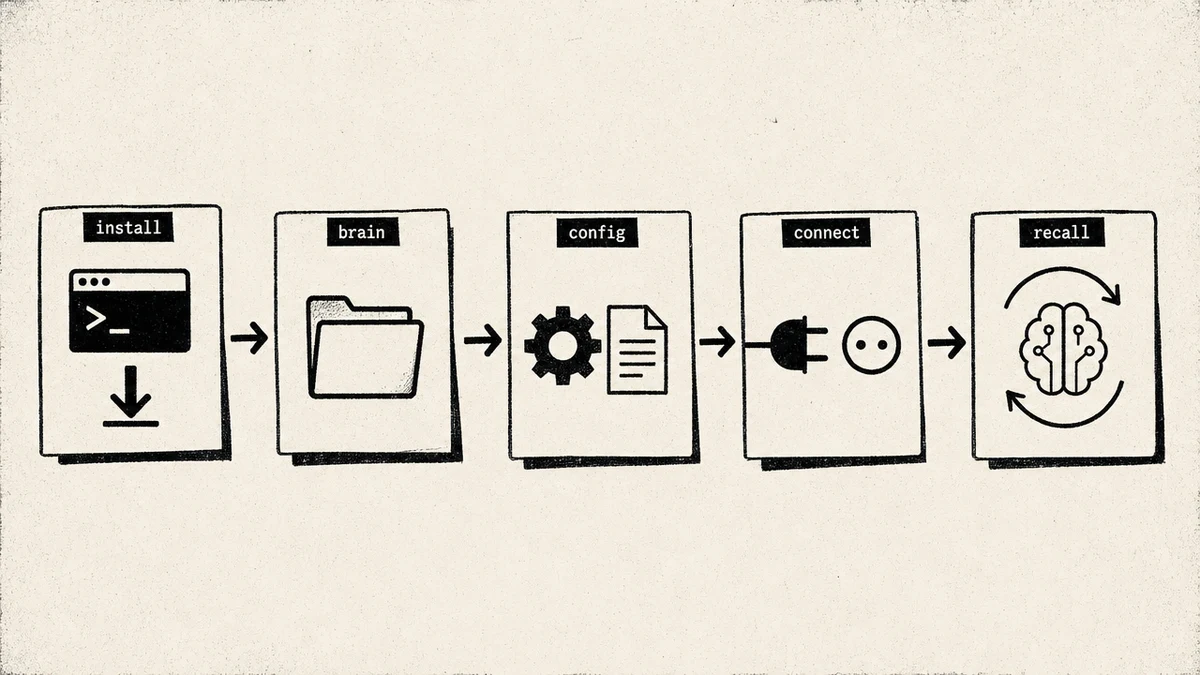
- Claude Desktop or Claude Code installed
- Node 18 or newer (
node --versionto check) - A terminal you are comfortable in
- npm (ships with Node)
- About 15 minutes
If you have all five, you are ready.
Step 1: Install the package
MemoryOS ships as a single npm package that gives you both a command-line tool and the MCP server. Install it globally:
npm install -g @iwo-szapar/second-brain-health-check
Verify the install:
second-brain-health-check --version
If that prints a version number, the binary is on your path and you are good. If the command is not found, see Troubleshooting at the end.
Step 2: Pick your brain folder
MemoryOS works on one principle: a single folder is the source of truth for your memory. Every decision, fact, and open loop lives there as plain text the model can read in one pass.
Pick a home for it. I use ~/brain. Create it and move in:
mkdir -p ~/brain
cd ~/brain
One folder, owned by you, in plain files. No cloud database, no vendor lock-in. If you ever walk away from MemoryOS, your memory is still readable text on your disk.
Step 3: Configure the MCP client
Now point your Claude client at the memory server.
Claude Desktop (macOS). Open the config file at ~/Library/Application Support/Claude/claude_desktop_config.json and add the memoryos server. Replace the path with your own brain folder:
{
  "mcpServers": {
    "memoryos": {
      "command": "second-brain-health-check",
      "args": ["mcp"],
      "env": {
        "BRAIN_DIR": "/Users/you/brain"
      }
    }
  }
}
Claude Code. Add the same block to .mcp.json in your project root (or your global Claude Code config):
{
  "mcpServers": {
    "memoryos": {
      "command": "second-brain-health-check",
      "args": ["mcp"],
      "env": {
        "BRAIN_DIR": "/Users/you/brain"
      }
    }
  }
}
Save the file and restart the client fully. Claude Desktop needs a quit and reopen, not just a window close. Claude Code picks up .mcp.json on the next launch.
On Windows, the Claude Desktop config lives at %APPDATA%\Claude\claude_desktop_config.json. On Linux, it is at ~/.config/Claude/claude_desktop_config.json. The server block is identical. Only the BRAIN_DIR path changes to match your system.
Step 4: Verify the connection
Open Claude and ask it to list the memory tools:
list memoryos tools
You should see five tools on the free tier:
memoryos tools available:
  store    save a memory to a surface
  recall   retrieve memories ranked by relevance
  list     list memories on a surface
  search   keyword search across surfaces
  health   report on size, staleness, and duplicates
If you see those five, the server is connected and reading your brain folder. If the tools do not appear, jump to Troubleshooting.
Step 5: Store your first memory
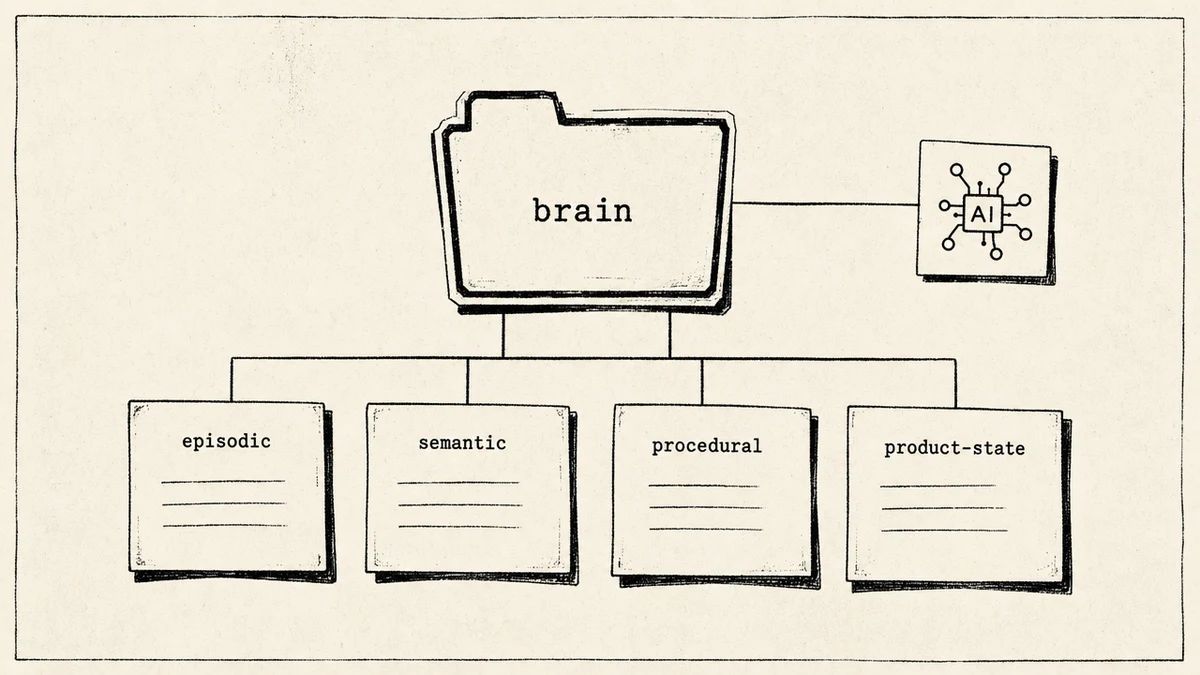
Memory in MemoryOS is typed. Instead of one undifferentiated pile of notes, you write to surfaces, and the model reads each surface differently:
- Episodic: things that happened (a meeting, a call, a decision)
- Semantic: durable facts (your pricing, your stack, your positioning)
- Procedural: how you do things (your release checklist, your writing process)
- Product state: the current status of active work
Typing matters because the model reads each surface with a different question in mind. It checks semantic memory for facts, episodic memory for what happened, and product state for where things stand right now. Retrieval stays scoped, so a question about a decision searches your decisions instead of your entire history. That scoping is what keeps recall fast and accurate as the brain grows.
Store a decision:
store this decision: we moved pricing to a hybrid model, usage plus a seat fee, decided 2026-05-18
Store a fact:
store this fact: our primary database is Postgres on Supabase, service-role key only on the server
Store project state:
store project state: the blog auto-deploy cron is built and tested, waiting on the preview gate before launch
Each call writes a small, dated text record to the matching surface in your brain folder. You can open the files and read them. Nothing is hidden.
Step 6: Recall what you stored
This is the moment the setup pays off. Ask Claude a question and let it pull from memory:
recall what did I decide about pricing?
MemoryOS returns ranked results with a confidence score, not a wall of raw notes:
Pricing moved to a hybrid model (usage + seat fee).
  surface: semantic / decisions
  stored: 2026-05-18
  confidence: 0.92
The confidence score matters. It tells you how sure the system is that this memory answers your question, so you know when to trust the recall and when to dig deeper. Ask it something you never stored and it tells you it has nothing, instead of inventing an answer.
Try a fact next:
recall what database do we use?
Primary database is Postgres on Supabase. Service-role key stays on the server.
  surface: semantic / facts
  stored: 2026-05-18
  confidence: 0.89
Same pattern, different surface. The model pulls the fact, cites where it came from, and scores its own confidence. Over time this is how Claude answers from your context instead of from a generic guess.
Step 7: Run the health check
Memory rots if you never tend it. The CLI ships an audit for exactly this:
second-brain-health-check audit
It reports what is in your brain, what has gone stale, and what looks duplicated. Run it once a week. Ten minutes of pruning keeps recall sharp, because a clean brain returns better results than a bloated one.
What to store first
Seed your brain with these five on day one:
- Open loops: anything unfinished you do not want to forget
- Recent decisions: the last month of calls you made and why
- Project state: where each active project actually stands
- Reference material: the facts you look up again and again
- Recurring goals: what you are working toward this quarter
What changes after the first month
Give it a few weeks of real use and the difference shows up in small moments. You ask Claude to draft a follow-up and it already knows the terms you agreed on. You start a new session and it picks up the project where you left it, not where the documentation left off, which is exactly how my AI remembered the way it built a finance app across sessions.
The compounding is the point. Every decision you store is one you never re-explain. After a month, the brain folder holds the context that used to live only in your head, and Claude reads it on demand. The model stops being a smart stranger and starts being an assistant that has been paying attention.
Troubleshooting
MCP not loading. The tools do not appear in Claude. Check that the config file is valid JSON (a trailing comma breaks it), confirm the command path resolves (which second-brain-health-check), and restart the client fully. Claude Desktop must quit and reopen.
Recall returns nothing. You stored memories but recall comes back empty. Confirm BRAIN_DIR in the config points at the same folder you stored into. A common mistake is storing from one folder and pointing the server at another.
Permissions error on the brain folder. The server cannot read or write. Fix ownership and permissions:
chmod -R u+rw ~/brain
Package not found after install. second-brain-health-check is not recognized. Your global npm bin is not on your path. Find it with npm bin -g and add that directory to your PATH, then open a new terminal.
Upgrading to the paid tier
The free tier and its five tools cover most personal use. When you want more, the paid tier adds six tools behind an SBF_TOKEN: advanced query, multi-brain support, sync across machines, a deeper audit, and more. Pricing is $199 a year for Standard and $349 a year for Pro.
If you want the full workflow on top of the memory layer, Iwo's Second Brain template ships the folder structure, the surfaces, and example routines, from $197 for the DIY tier.
FAQ
Does this work with ChatGPT?
MemoryOS speaks the Model Context Protocol, so it works with any MCP client. Claude Desktop and Claude Code are the primary targets. ChatGPT does not support MCP the same way today, so the smooth path is Claude.
Is my memory stored locally or in the cloud?
Locally, in the brain folder you chose. The free tier never sends your memory anywhere. Sync across machines is a paid add-on you opt into, not a default.
Can I use this with Cursor or other MCP clients?
Yes. Any client that reads an MCP config works. Point it at the same command and BRAIN_DIR and it reads the same brain.
What happens if I delete the brain folder?
You lose the memory in it, the same as deleting any folder of files. Back it up like you would any folder that matters. A git repo or a synced drive both work.
How is this different from Anthropic's official Memory MCP?
Anthropic's Memory MCP is a minimal key-value store. MemoryOS adds typed surfaces, recall scoring, and the weekly health check. If you want the lightest possible setup, the official server is fine. If you want structure and confidence scores, MemoryOS is built for that.
Where do I get the SBF_TOKEN?
From your account after you upgrade to a paid tier on Iwo's MemoryOS page. The free tier needs no token.
Closing
Persistent memory changes how you work with Claude. You stop re-explaining yourself and start building on what you already decided. The setup is 15 minutes, and the payoff compounds every session after.
Start with the free tier and the five tools. When you want the full workflow, Iwo's Second Brain template and Iwo's MemoryOS memory layer are built to grow with you. If you would rather build it with guidance, the bootcamp walks you through it end to end.
Want the memory layer that works with Claude, Cursor, or your own folder structure? See Iwo's MemoryOS. For the full workflow on top, see Iwo's Second Brain.
Related guides
Read next
Your Second Brain is blind without MCP
How Model Context Protocol turns stored memory into action.
Apply it
Second Brain Setup Health Check
Score an existing setup and see what is missing.
Product path
MemoryOS
Persistent memory and skill infrastructure for serious AI work.
Product path
Second Brain 2.0 for developers
The full operating system for Codex, Claude Code, and local agent workflows.