Digital Transformation for Nonprofits Starts With Institutional Memory
Fifteen organizations, three days, and one lesson I keep thinking about: useful AI work starts with what a team already knows.
Digital transformation for nonprofits starts by making operating knowledge usable. Give people clear sources, named owners, decision records, and safe AI boundaries. Then improve one workflow that a human can check.
That sounds less exciting than buying an AI tool. It is also where the work becomes useful.
A few days ago I spent three days in Warsaw with roughly fifty people from organizations working on democracy and civil society in Poland.
Fifteen teams built AI prototypes. Most left with something they could show their colleagues. The hard conversations were not about prompts, models, or tools.
They were about whom the teams serve, where a process breaks, and which decisions must stay with a person. They were about the unusual cases that appear rarely, then cause real damage when a system gets them wrong.
At the AI Impact Lab, every team worked through the same 17 steps. We started with one problem, one user, and one meaningful outcome. The building came after the hard thinking.
That order matters for a nonprofit second brain too.
What digital transformation means for nonprofits
For a nonprofit, digital transformation is the practical work of making good decisions easier to repeat. It means a new program coordinator can find the current grant commitment. A fundraiser can prepare for a meeting without guessing which promise was made. A board member can see the source behind a reported outcome.
It does not require turning the organization into a software company. It requires deciding how important work gets remembered.
Most nonprofits already have the raw material:
- Grant applications and reporting calendars.
- Program notes, case patterns, and outcome evidence.
- Donor and partner relationship history.
- Board packs, policy documents, and risk decisions.
- The judgment of people who know why the work happens the way it does.
The material is usually scattered across shared drives, inboxes, project tools, personal notes, and memories. It has uneven permissions. It is hard to assemble when a real decision arrives.
When an executive director, program lead, or long-standing volunteer leaves, the organization can lose more than files. It can lose the history behind a funder relationship, the exception inside a policy, or the reasoning that made a program work. The National Council of Nonprofits makes the same point in its succession-planning guidance: leadership transitions can mean losing institutional knowledge and relationships.
A second brain gives that knowledge a working shape. It does not replace the systems where money, consent, case notes, or official records belong. It connects the right people to the current source, the owner, the decision history, and the next review.
The operating layer: five things every important record needs
A useful second brain is not a giant archive. It is a small operating layer on top of the systems you already trust.
For each active program, funder, partnership, or operating process, create a short living record with these fields:
| Field | What to capture | Why it matters |
|---|---|---|
| Purpose | The outcome this work is meant to create. | Stops a record becoming a pile of facts with no decision context. |
| Source, version, and date | The approved document, system record, or meeting note, linked directly with its current version or review date. | Lets someone check a claim instead of trusting a summary that may be out of date. |
| Owner and review date | One accountable person and the next date the record must be checked. | Makes staleness visible before it becomes a handover problem. |
| Decisions and rationale | What changed, why it changed, and what evidence could change it again. | Preserves judgment, not only the final answer. |
| Access level | Public, internal, confidential, or role-restricted. | Keeps sensitive information out of the wrong workflow. |
That is the minimum record. Do not expand it until people can keep it current.
The first four fields make information findable and auditable. The fifth is a safety control. Nonprofits often hold donor data, beneficiary information, employment matters, safeguarding records, and sensitive community context. The TechSoup AI usage-policy template calls out privacy, security, consent, anonymization, and access controls as questions an AI policy should cover.
Before the first prompt, the organization needs to make four decisions:
- Sources: Which documents, folders, public pages, or systems are permitted for this work?
- Scope: Which data types and fields are excluded, even if they are technically available?
- Permissions: May AI read, draft, compare, or only flag gaps? What may it never do?
- Control: Who approves the result, when must the system say “I don’t know,” and who can stop access?
These decisions came before the prototypes at AI Impact Lab. A file being stored in a cloud drive did not make it approved for AI use. The organization chose which doors to open, for what purpose, and who could close them again.
The relationship between those records matters too. A funder commitment should connect to the program it supports, the report it requires, the decisions that affect delivery, and the person who owns the next conversation. Graph Engineering for a Working Second Brain explains why these connections matter more than a bigger folder tree.
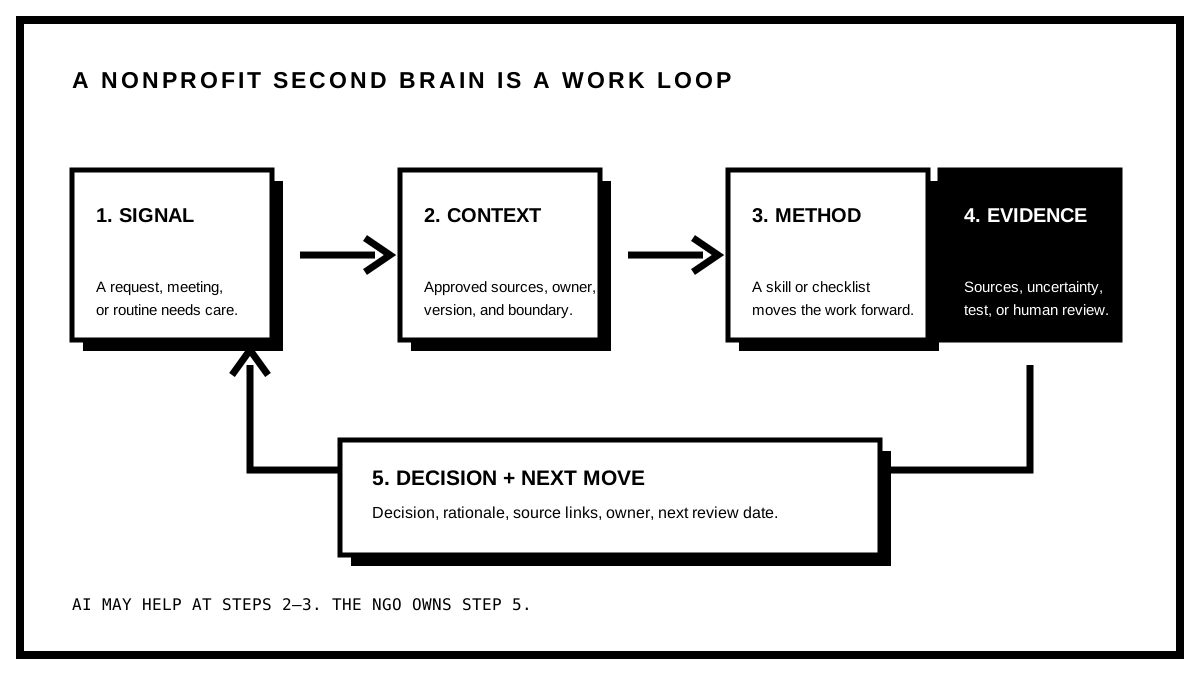 The loop to build: a real request produces a checked decision, and that decision improves the record for the next person.
What the AI Impact Lab teams actually built
The 15 teams did not all build the same thing. We did not ask them to copy a full Second Brain or to produce a finished product in three days.
We asked each team for one safe, visible proof that a useful flow could work. Every prototype had one user, one job, an approved input, a clear boundary, and a person who remained responsible for the next decision.
Three starting points kept appearing:
| Prototype shape | One useful question | Visible proof | Where it stops |
|---|---|---|---|
| Internal knowledge | “Which procedure applies in this situation?” | An answer with a source, date or version, and named owner. | When the approved corpus has no basis for an answer, it says so and directs the user to the owner. |
| Coordination | “What is the project status and where is a decision needed?” | A neutral status showing the decision, evidence, blocker, owner, and next move. | It does not expose chat histories or sensitive records to a wider group. |
| Public-source monitoring | “What changed on these three specified public pages?” | A short table with source, date, change, link, and question for a human. | It does not expand the source list, log into private accounts, or decide what to publish. |
These are different products. They share the same discipline: source, owner, boundary, evidence, and a human decision.
The prototype card we used before building
Before opening a tool, teams had to name four things:
- User and job: One person or role, and one task that should become easier.
- Source and boundary: The approved material or safe sample, plus what the prototype must not touch.
- Proof and mentor: What another person can see at the end, and who can help if the team is blocked.
- Stop rule: The uncertainty, missing access, or hard case that sends the work back to a person.
That card is more useful than a feature list. It makes a prototype possible to test, improve, hand over, or stop.
Start with one handover risk
The best first use case is rarely the most impressive one. It is a repeated moment where someone must reconstruct context under pressure.
Good candidates have four properties:
- The work happens often enough to improve.
- People currently open several sources or ask one experienced colleague for help.
- A wrong answer can be caught before it affects a person, promise, or payment.
- A named owner can maintain the record after the pilot.
Choose one narrow problem. A useful problem statement has this shape:
When [role] needs to [make a recurring decision], they spend [time] gathering context from [sources]. We will reduce that effort while keeping [human approval] in place.
For example:
When a fundraising manager prepares for a funder meeting, they spend 90 minutes searching grant files, old reports, and inboxes. We will prepare a cited brief in 20 minutes, with the relationship owner approving every external claim.
That statement gives the team something testable. “Use AI to improve fundraising” does not.
Four first workflows that usually work
| Workflow | Trigger | Record you build | Human check |
|---|---|---|---|
| Funder continuity brief | A meeting, report, or renewal is due. | Current agreement, reporting dates, prior commitments, evidence, open risks. | Relationship owner checks every promise and donor-sensitive detail. |
| Board decision pack | A board meeting needs a decision. | Decision question, options, source evidence, recommendation owner, prior decisions. | Executive director or board chair approves the pack. |
| Program handover | A coordinator joins, changes role, or leaves. | Current process, exceptions, source documents, contacts, next deadlines. | Program lead tests it with the incoming person. |
| Policy review brief | A policy reaches its review date. | Existing policy, changes in practice, open questions, accountable owner. | The policy owner signs off on every revision. |
Begin with a workflow people already care about. A pilot gets adopted when it removes a real Tuesday-morning problem.
A worked example: the funder continuity brief
The funder brief is a good first workflow because it joins knowledge management, risk control, and clear human judgment.
1. Map the current path
Ask the relationship owner to prepare for the next funder meeting as they normally would. Watch the work.
Write down:
- Every source opened.
- Every person asked for context.
- Every claim that needs evidence.
- Every piece of information that must not leave the team.
- The final decision-maker for meeting notes, commitments, and follow-up.
You are looking for the places where the work depends on someone remembering an unwritten detail.
2. Create a source list before using AI
Make a small inventory. A first version might include the signed agreement, reporting schedule, latest approved report, budget status, current program milestone note, previous meeting notes, and relationship-owner notes.
For each source, label it:
- Authoritative: the record can support a factual claim.
- Contextual: it helps someone understand history but needs checking.
- Restricted: it should never enter a general AI prompt or shared brief.
This distinction prevents a neat-looking summary from becoming an untraceable one.
3. Build the brief as a decision object
The brief needs less prose than most teams expect. Use a consistent structure:
- Meeting purpose: What decision, update, or request is this meeting for?
- Current commitments: What has the organization formally promised? Link every claim.
- Evidence and delivery: Which outcomes are verified, which are in progress, and which need a caveat?
- Relationship context: What should the owner know before entering the room? Label notes as notes.
- Open risks: What could affect delivery, reporting, or trust?
- Questions for a human: What cannot be resolved from the source material?
- Next actions: Who owns each follow-up and when will the record be updated?
An AI assistant can draft this brief after the sources and access rules are clear. Require a source link for every factual statement. Ask it to mark uncertainty. Keep it away from restricted records.
The relationship owner still decides what is true, what is appropriate to share, and what the organization will promise next.
4. Test the normal path and one hard case
Run the brief once with a normal meeting request. Then give it one difficult situation: a missing source, an out-of-date report, a protected note, or an unclear commitment.
The correct response in the hard case may be “I don’t know, ask this owner.” That is evidence the boundary works. A system that always produces an answer is unsafe in exactly the situations where the team needs it most.
5. Test it against a known answer
Pick five questions that an experienced colleague can answer from memory. For example: “When is the next report due?” or “Which result did we promise to report this quarter?”
Give the brief to someone newer to the work. Measure:
- How long it takes them to find the answer.
- Whether they can open the underlying source.
- Whether they know what remains uncertain.
- Whether the owner would trust the result in a meeting.
If the brief produces a confident but unsupported answer, fix the source structure before adding more automation.
Give AI a narrow job and a hard boundary
AI helps when the input is stable, the output can be checked, and the cost of a mistake is low or contained.
| Let AI help with | Keep with a person |
|---|---|
| Turning approved meeting notes into a draft action list. | Deciding eligibility, safeguarding, funding commitments, or public claims. |
| Finding missing fields or overdue review dates. | Interpreting sensitive beneficiary information. |
| Producing a first-pass status update from approved records. | Approving a new policy or exception. |
| Grouping source-backed answers for a human to review. | Sending commitments, recommendations, or external communication without review. |
Write these boundaries down. They should answer four questions:
- Which systems and fields can the tool read?
- Which data must be removed, anonymized, or kept out entirely?
- Who can approve an exception?
- Where does someone report a wrong, harmful, or surprising output?
This is a governance decision, not a settings screen. A model can generate an answer. The team decides whether that answer is safe to act on.
Missing access is not a reason to quietly use a protected source. It is a stop condition. Use an approved synthetic sample, a public document, or a manual mock-up to test the workflow until the data owner makes a decision.
The broader discipline is context engineering: make the relevant facts, constraints, sources, and permissions available before asking for output. Better prompts cannot repair missing context or a bad access decision.
Keep the source system and the working system separate
One trap is copying everything into a new tool. That creates another place for records to go stale.
Use this division instead:
| Layer | Job | Examples |
|---|---|---|
| System of record | Holds the official, detailed, or regulated data. | CRM, finance system, case-management tool, signed agreements, HR system. |
| Working knowledge layer | Connects the current source to a purpose, owner, decision, and review date. | Funder continuity brief, decision log, program handover page. |
| AI assistance | Retrieves, drafts, checks completeness, or prepares a reviewable first pass. | Cited brief draft, overdue-review list, meeting action draft. |
The working layer should point back to the source system. It should not pretend to be the official record.
For teams building this kind of durable system, a Second Brain Setup Health Check can reveal where context, retrieval, and maintenance are weak before more tools get added.
Run a 30-day pilot, not a transformation programme
Large transformation plans often fail because nobody can tell what improved. A 30-day pilot creates evidence.
Days 1 to 5: choose and map
- Pick one workflow and one accountable owner.
- Write the problem statement.
- Observe the current process once.
- List sources, restrictions, decisions, and failure points.
- Record a baseline: time taken, number of sources opened, and confidence in the result.
Days 6 to 10: build the minimum record
- Create the five-field record for the active work.
- Link back to sources rather than copying them.
- Add review dates and access labels.
- Agree the AI boundary with the people who own the risk.
Days 11 to 20: test with real work
- Use the record for two or three genuine requests.
- Ask a newer colleague to retrieve a known answer.
- Compare their result with the owner’s answer.
- Record every missing source, unclear label, and unsafe output.
Days 21 to 30: decide what earns expansion
- Keep what saved time without reducing care.
- Fix records that produced unsupported answers.
- Remove automation that created more checking work than it saved.
- Decide whether the next workflow deserves the same treatment.
The AI Work Cycle is useful here because it treats planning, work, review, triage, and learning as one loop. An AI pilot needs that review step as much as a technical project does.
Measure continuity, not tool adoption
Avoid reporting success as “we have an AI license” or “we migrated 3,000 files.” Those numbers do not tell you whether the organization can operate with more care.
Measure the workflow instead:
- Retrieval time: Can a new owner find a verified answer faster than before?
- Source coverage: What percentage of active briefs have an owner, source link, review date, and access label?
- Decision quality: How often does a reviewer accept a draft without finding unsupported claims?
- Handover resilience: Can someone cover a role for a week without hunting through a personal inbox?
- Safety: Did sensitive information reach a workflow where it did not belong? The target is zero.
Keep a short decision note after consequential meetings: what changed, why, who owns the next step, and when the record will be checked again. That habit is more valuable than a large migration project nobody maintains.
Common failure modes
| Failure | What it looks like | Correction |
|---|---|---|
| Starting with a platform | Months of demos, no reliable workflow. | Pick one repeated decision and map it first. |
| Uploading everything | A big search index with unclear permissions and stale answers. | Add only the sources needed for the first workflow. |
| No owner | A useful brief dies after the pilot. | Name the maintainer and next review date. |
| Treating an AI draft as a fact | Unsupported claims travel into reports or conversations. | Require sources and human approval for consequential output. |
| Measuring activity | File counts and licenses look good while handovers still hurt. | Measure retrieval, source coverage, and reviewer trust. |
Questions nonprofit leaders ask
What does digital transformation mean for a nonprofit?
It means improving how a nonprofit finds context, makes repeatable decisions, and maintains continuity when people change. Start with one workflow and the information required to run it well.
What should a nonprofit automate first?
Automate a small, reviewable task around an approved source. Drafting an action list from approved meeting notes or flagging an overdue review date is safer than automating eligibility, safeguarding, promises to funders, or public claims.
How can nonprofits use AI without exposing sensitive data?
Classify sources before use. Keep restricted beneficiary, employment, safeguarding, and confidential donor information out of general AI workflows. Document what the tool can read, who can approve an exception, and how staff report a problem.
How does knowledge management support nonprofit succession planning?
It keeps the decision history, relationship context, source links, and next actions available to the next accountable person. A handover becomes a checked working record rather than a hunt through somebody’s inbox.
The next step
If you lead operations, programs, fundraising, or digital work at a nonprofit, begin with one continuity failure that costs the team time or trust.
Map the handover. Name the sources. Set the access rules. Create a brief that a new person can use. Then add automation only where it can be checked.
The fifteen prototypes from Warsaw still have to meet real users. That part is slower and harder than building in a room together. We will see what survives.
I left more convinced that useful digital transformation makes an organization more able to remember, decide, and continue the work when people change. If you want to build the underlying system for your own work, see how my AI Second Brain is set up.